
Facebook Lead Forms
What are Facebook Lead Forms
Facebook Lead Forms are interactive forms used within Facebook Ads to collect contact details such as name, phone number, and email directly from potential customers without them leaving Facebook. They are ideal for generating leads quickly and can be fully integrated with Leads AI for automated tracking, follow-up, and campaign management. Facebook Lead Forms can only be created inside Facebook Ads Manager. Once created, they can be synced with Leads AI for automation and performance tracking.How to Sync Facebook Lead Forms with Leads AI
To sync your lead forms:- Navigate to https://app.leadsai.in/facebook/lead-forms
- Select the Facebook Page that owns the lead form.
- Click Sync to import your forms into Leads AI.
Configuring a Facebook Lead Form
- Campaign Assignment – A lead form can be linked to a campaign in Leads AI to track leads and monitor performance.
-
Automated WhatsApp Messaging – You can automatically send a WhatsApp template message as soon as someone submits a Facebook lead form.
A WhatsApp Business Account must be linked with Leads AI for this feature to work.
Rules for WhatsApp Template Field Mapping
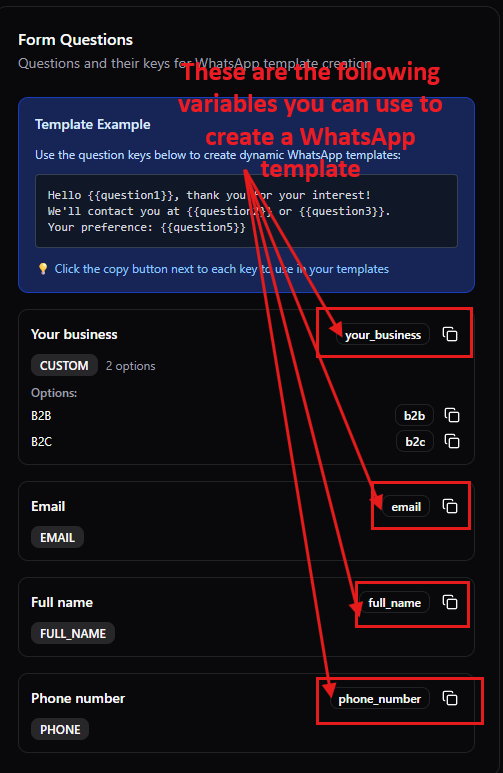
The following fields are strict and must be used exactly as defined.For the strict fields, please use the contact fields in facebook lead forms instead of creating your own fields
full_name– Lead’s name (optional)phone_number– Lead’s phone number (mandatory, required to send WhatsApp messages)email– Lead’s email address (optional)
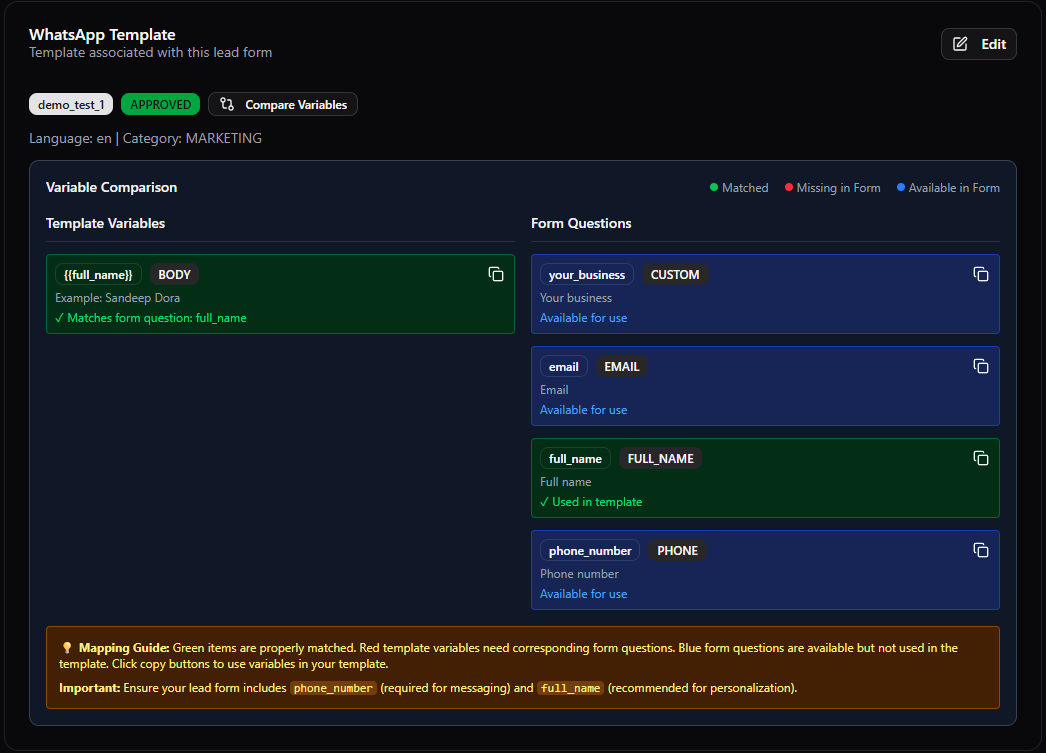
Example – Using Custom Fields in a WhatsApp Template
If your Facebook lead form contains the following fields:full_nameemailphone_numberyour_business(custom field)
{{full_name}}, {{email}}, {{your_business}}) should match exactly those shown on the right-hand side of the Lead Form details in Leads AI.
Why Configure Facebook Lead Forms in Leads AI
- Instant Engagement – Send automated WhatsApp messages to new leads within seconds of their form submission.
- Campaign Insights – Track how many leads each Facebook ad is generating.
- Lead Qualification – Capture and store custom field data for better targeting and personalization.